Blog

  • What Is Cloud Hosting? Meaning, How It Works, Benefits, and Use Cases Explained

    Introduction

    As websites grow and traffic patterns become unpredictable, traditional hosting models often struggle to keep up. Sudden traffic spikes can slow down servers, and single-server failures can cause downtime. This is where cloud hosting becomes relevant.

    Cloud hosting is designed to offer high reliability, scalability, and performance by distributing websites across multiple servers instead of relying on a single machine.

    This article explains what cloud hosting ishow cloud hosting works, its benefits and limitations, and who should choose cloud hosting. It also helps you understand when cloud hosting is a better choice than VPS or shared hosting.

    This article is part of our complete web hosting and domain guide (pillar page), which covers hosting fundamentals, types, performance, and SEO impact in detail.


    What Is Cloud Hosting?

    https://media.geeksforgeeks.org/wp-content/uploads/20210318074917/archcloud2.png
    https://www.atlantic.net/wp-content/themes/anet/img/what-is-cloud-hosting/graphic-what-is-cloud-hosting.webp
    https://images.squarespace-cdn.com/content/v1/678b1f8e72adda580889c414/bcb5688a-2210-4eac-ade1-d808cb1c2ee3/Cloud%2Bserver.jpg

    Cloud hosting is a type of web hosting where a website runs on a network of interconnected servers, commonly referred to as the “cloud,” rather than a single physical server.

    Instead of storing all website data on one machine, cloud hosting distributes data and workloads across multiple servers. These servers work together to deliver website content quickly and reliably.

    In simple terms, cloud hosting removes the dependency on one server and spreads the load across many servers.


    How Cloud Hosting Works

    In cloud hosting, your website is hosted on a cluster of servers connected through a centralized system. These servers share resources such as CPU, RAM, and storage.

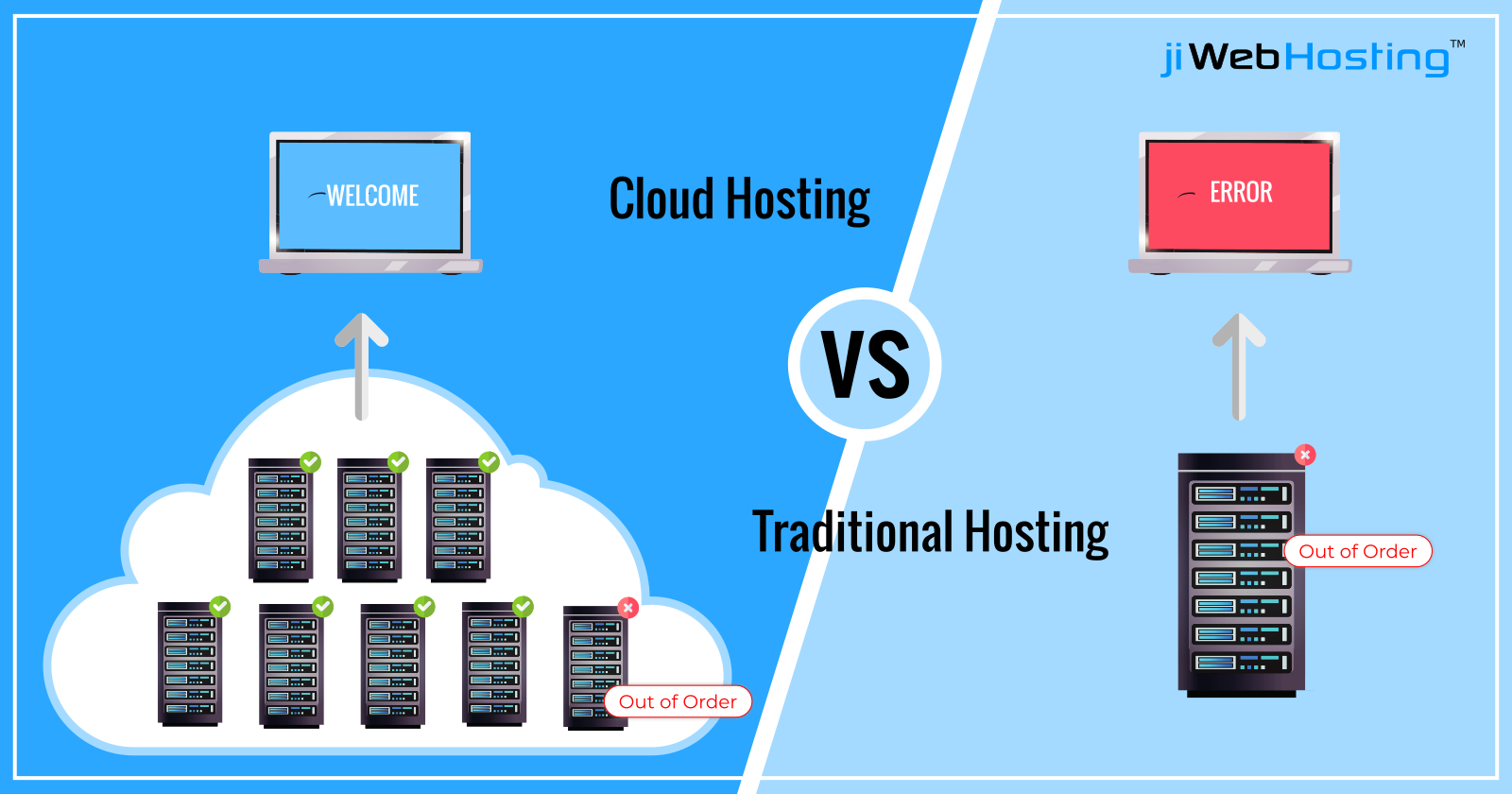
    When a user visits your website, the request is handled by the most available or best-performing server in the network. If one server becomes overloaded or fails, another server immediately takes over.

    This architecture ensures high availability and minimizes downtime, even during heavy traffic or hardware failures.


    Why Cloud Hosting Is Different from Traditional Hosting
    https://jiwebhosting.com/blog/image/84?file=post-1568785254-image_file-user_id_79.png
    https://verpex.com/assets/uploads/images/blog/cloud-server-vs-dedicated-server.png?v=1665489519
    https://media.geeksforgeeks.org/wp-content/uploads/20240517174831/Redundancy-vs-Replication.webp

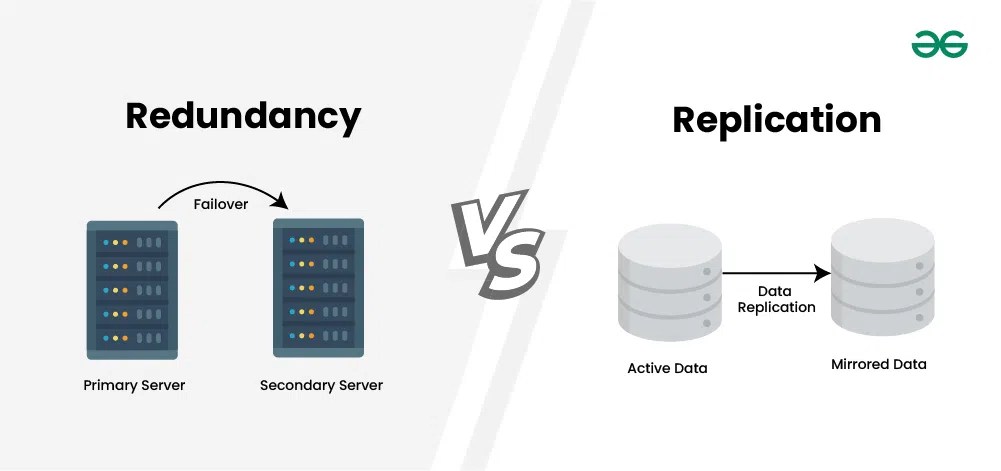
    Traditional hosting models such as shared or VPS hosting rely on a single physical server. If that server faces issues, websites hosted on it are affected.

    Cloud hosting removes this single point of failure. Since multiple servers are involved, websites remain online even if individual servers encounter problems.

    This difference makes cloud hosting more resilient and scalable compared to traditional hosting options.


    Key Benefits of Cloud Hosting

    One of the biggest advantages of cloud hosting is scalability. Resources can be increased or decreased dynamically based on traffic needs. This is especially useful for websites that experience sudden or seasonal traffic spikes.

    Cloud hosting also offers high uptime. Since websites are not tied to one server, downtime is significantly reduced.

    Performance is another major benefit. Load balancing ensures that no single server becomes overloaded, resulting in faster page load times and better user experience.

    For businesses, cloud hosting provides flexibility. Websites can scale without complex migrations or downtime.


    Limitations of Cloud Hosting

    https://www.cloudcredential.org/wp-content/uploads/2019/08/Screenshot-2020-03-25-at-14.35.52.png
    https://www.jamcracker.com/sites/default/files/2024-02/fundamentals-of-cloud-cost-management-jamcracker.webp
    https://feb17d08.delivery.rocketcdn.me/wp-content/uploads/2023/08/complexity_in_the_cloud-1.jpg

    Despite its advantages, cloud hosting has some limitations.

    Cost management can be challenging. Many cloud hosting plans use usage-based pricing, which means costs can increase as resource usage grows. Without proper monitoring, expenses may rise unexpectedly.

    Cloud hosting can also be more complex than shared hosting. While many providers offer managed solutions, the underlying architecture is more advanced.

    For very small websites with stable, low traffic, cloud hosting may be unnecessary and cost-inefficient.


    Cloud Hosting vs VPS Hosting: Understanding the Difference

    VPS hosting provides dedicated resources on a single physical server, offering stability and predictable pricing.

    Cloud hosting distributes resources across multiple servers, offering higher reliability and scalability.

    VPS hosting is ideal for steady, predictable traffic. Cloud hosting is better for websites with fluctuating or rapidly growing traffic.

    The choice depends on how your traffic behaves rather than which option sounds more advanced.


    Is Cloud Hosting Good for SEO?

    Cloud hosting can positively support SEO by improving website speed, uptime, and reliability.

    Faster page loads and fewer outages improve user experience, which indirectly benefits search performance. Cloud hosting also handles traffic spikes better, preventing slowdowns during high-demand periods.

    However, cloud hosting alone does not guarantee better rankings. It provides the infrastructure needed to support SEO efforts, but content quality and optimization remain essential.

    For deeper insights, refer to our guide on how hosting affects website speed and best server location for Indian websites.


    Who Should Use Cloud Hosting?

    Cloud hosting is ideal for websites that require flexibility and reliability.

    It works well for eCommerce websites, SaaS platforms, content publishers with high traffic, and businesses running marketing campaigns that cause traffic spikes.

    Startups planning rapid growth also benefit from cloud hosting because it supports scaling without major infrastructure changes.


    When Should You Upgrade to Cloud Hosting?

    Upgrading to cloud hosting makes sense when VPS hosting can no longer handle traffic variability or uptime requirements.

    If your website experiences sudden traffic surges, downtime during peak periods, or frequent resource bottlenecks, cloud hosting is often the best solution.

    Planning this upgrade early helps avoid performance issues that can affect SEO, conversions, and user trust.


    Cloud Hosting and Website Performance

    Cloud hosting architecture improves performance by distributing load across multiple servers. This reduces server response times and improves stability under heavy traffic.

    Load balancing, redundancy, and dynamic resource allocation make cloud hosting one of the most performance-oriented hosting solutions available today.

    To understand performance in more detail, read our dedicated guide on how hosting affects website speed.


    Frequently Asked Questions (FAQ)

    What is cloud hosting in simple words?

    Cloud hosting means your website runs on multiple connected servers instead of one server.

    Is cloud hosting better than VPS hosting?

    Cloud hosting offers better scalability and uptime, while VPS hosting offers predictable pricing and control.

    Is cloud hosting expensive?

    Cloud hosting can be cost-effective, but usage-based pricing requires monitoring to avoid unexpected costs.

    Is cloud hosting suitable for beginners?

    Managed cloud hosting can be suitable for beginners, but shared hosting is often simpler for very small websites.

  • What Is VPS Hosting? Meaning, How It Works, Pros and Cons Explained

    Introduction

    As a website grows, shared hosting often starts showing limitations. Pages load slower, traffic spikes cause issues, and server restrictions prevent proper optimization. This is usually the stage where website owners start hearing about VPS hosting.

    VPS hosting sits between shared hosting and dedicated hosting. It offers better performance and control than shared hosting, without the high cost of a dedicated server.

    This article explains what VPS hosting ishow VPS hosting works, its advantages and disadvantages, and who should use VPS hosting. It is written to help you decide whether VPS hosting is the right upgrade for your website.

    This article is part of our complete web hosting and domain guide (pillar page), which covers hosting basics, types, performance, and SEO impact in detail.


    What Is VPS Hosting?

    https://verpex.com/assets/uploads/images/blog/VPS-HOSTING.png?v=1665489658
    https://verpex.com/assets/uploads/images/juxtapose/shared-hosting-vs-vps-hosting.png?v=1669026423
    https://www.hostitsmart.com/blog/wp-content/uploads/2023/02/How-Does-a-VPS-Work.jpg

    VPS hosting stands for Virtual Private Server hosting. It is a type of web hosting where a single physical server is divided into multiple virtual servers using virtualization technology.

    Each virtual server works like an independent server with its own:

    • CPU allocation
    • RAM allocation
    • Storage space
    • Operating system

    Although multiple VPS users share the same physical hardware, their environments are isolated from each other.

    In simple words, VPS hosting gives you your own private space on a server, unlike shared hosting where everything is shared.


    How VPS Hosting Works

    A physical server is first set up with virtualization software, such as a hypervisor. This software divides the server into multiple virtual machines.

    Each virtual machine acts as a standalone server. Your website runs inside one of these virtual servers, with resources reserved specifically for you.

    When someone visits your website, only your VPS resources are used to handle the request. Other websites on the same physical server cannot consume your allocated CPU or RAM.

    This isolation is the key reason VPS hosting delivers better performance and stability than shared hosting.


    VPS Hosting vs Shared Hosting: The Core Difference

    https://verpex.com/assets/uploads/images/blog/VPS-vs-Shared-Hosting.webp?v=1665751748
    https://www.hostafrica.com/wp-content/uploads/2017/10/Shared-VS-VPS.png

    The main difference between VPS hosting and shared hosting lies in resource allocation and isolation.

    In shared hosting, all websites compete for the same pool of resources. If one website uses too much CPU or memory, others are affected.

    In VPS hosting, your resources are reserved. Even if other VPS users experience high traffic, your website performance remains stable.

    This makes VPS hosting far more reliable for growing websites.


    Types of VPS Hosting: Managed vs Unmanaged

    VPS hosting is commonly offered in two formats: managed and unmanaged.

    Managed VPS Hosting

    In managed VPS hosting, the hosting provider takes care of server maintenance tasks. These include server updates, security patches, monitoring, and basic troubleshooting.

    Managed VPS is ideal for website owners who want better performance but do not want to manage servers themselves.

    Unmanaged VPS Hosting

    In unmanaged VPS hosting, the user is responsible for everything, including server setup, updates, security, and maintenance.

    This option is suitable only for developers or system administrators with strong technical knowledge.

    For most website owners, managed VPS hosting is the safer and more practical choice.


    Advantages of VPS Hosting

    VPS hosting offers a strong balance between performance, control, and cost.

    One major advantage is consistent performance. Since resources are dedicated, your website loads faster and handles traffic more efficiently.

    Another benefit is increased control. Users can customize server settings, install software, and configure environments based on their needs.

    VPS hosting also offers better security compared to shared hosting because each virtual server is isolated.

    For growing websites, VPS hosting provides the flexibility to scale resources without migrating to a completely different hosting type.


    Disadvantages of VPS Hosting

    https://images.websitebuilderexpert.com/wp-content/uploads/2022/08/31032502/VPS-Best-InMotion-pricing-1.png?fit=crop&height=400&width=880
    https://www.dnsstuff.com/wp-content/uploads/2019/12/what-is-server-management.png
    https://www.milesweb.com/blog/wp-content/uploads/2025/11/benefits-of-windows-vps.png

    Despite its benefits, VPS hosting is not perfect for everyone.

    Cost is higher than shared hosting. While still affordable compared to dedicated servers, VPS hosting may be expensive for very small websites.

    VPS hosting also introduces technical complexity. Even managed VPS plans require a basic understanding of hosting concepts.

    Improper configuration can lead to performance or security issues, which makes choosing a reliable hosting provider important.


    Is VPS Hosting Good for SEO?

    VPS hosting can positively impact SEO when compared to shared hosting.

    Faster server response times, improved uptime, and better handling of traffic spikes all contribute to a better user experience. These factors indirectly support stronger SEO performance.

    However, VPS hosting alone does not guarantee rankings. It simply removes performance-related limitations that can hold a website back.

    To understand performance impact more deeply, refer to our guide on how hosting affects website speed.


    Who Should Use VPS Hosting?

    VPS hosting is ideal for websites that have outgrown shared hosting but do not yet need cloud or dedicated hosting.

    It is suitable for content publishers with steady traffic, business websites generating leads, WordPress sites with advanced plugins, and early-stage SaaS platforms.

    If your website experiences slow loading times on shared hosting or receives consistent traffic, VPS hosting is usually the right upgrade.


    When Should You Upgrade to VPS Hosting?

    The right time to move to VPS hosting is when shared hosting starts limiting growth.

    Common signs include frequent slowdowns, resource limit warnings, downtime during traffic spikes, and poor backend performance.

    Upgrading early prevents performance issues from affecting SEO, conversions, and user trust.


    VPS Hosting vs Cloud Hosting (Brief Context)

    VPS hosting offers predictable resources and pricing. Cloud hosting focuses on scalability and redundancy.

    VPS hosting is ideal for steady growth. Cloud hosting is better for unpredictable or rapidly scaling traffic.

    Understanding this difference helps you choose hosting based on traffic behavior rather than marketing claims.


    Frequently Asked Questions (FAQ)

    What is VPS hosting in simple words?

    VPS hosting means your website runs on a virtual server with dedicated resources.

    Is VPS hosting better than shared hosting?

    Yes. VPS hosting provides better speed, stability, and control.

    Do I need technical knowledge for VPS hosting?

    Basic knowledge is helpful. Managed VPS plans reduce technical responsibility.

    Is VPS hosting expensive?

    It costs more than shared hosting but is much cheaper than dedicated hosting.


    Internal Linking Note

    This page supports our types of web hosting cluster and links back to the main web hosting and domain guide (pillar page).
    For performance-specific insights, refer to our speed and server location cluster articles.


    Final Thoughts

    VPS hosting is a natural upgrade for websites that are growing beyond the limits of shared hosting. It provides better performance, improved security, and more control without the complexity of dedicated servers.

    For most serious websites, VPS hosting represents the point where hosting becomes a growth enabler rather than a limitation.

    Understanding when and why to move to VPS hosting helps avoid performance bottlenecks and prepares your website for the next stage of growth.

  • What Is Shared Hosting? Meaning, How It Works, Pros and Cons Explained

    Introduction

    If you are creating your first website, shared hosting is usually the first hosting option you will come across. It is affordable, easy to manage, and widely promoted by hosting providers. Because of this, many beginners choose shared hosting without fully understanding what it is and how it works.

    This article explains what shared hosting ishow shared hosting works, and the real pros and cons of shared hosting. The goal is to help beginners decide whether shared hosting is suitable for their website or if they should consider other hosting types.

    This article is part of our complete web hosting and domain guide (pillar page), where we explain hosting fundamentals, types, performance, and SEO impact in detail.

    Shared hosting is a type of web hosting where multiple websites are hosted on a single physical server. All websites on that server share the same resources, including CPU, RAM, storage, and bandwidth.

    In this setup, the hosting provider manages the server completely. Users only need to upload their website files, manage basic settings through a control panel, and focus on content or business activities.

    Shared hosting is designed to make website creation simple and affordable, especially for beginners.


    How Shared Hosting Works

    When you purchase a shared hosting plan, your website is placed on a server that already hosts many other websites. Each website gets a small portion of the server’s total resources.

    Whenever someone visits your website, the server processes the request and sends the website files to the visitor’s browser. At the same time, the same server is handling requests for other websites hosted on it.

    As long as overall usage remains normal, websites perform well. Problems arise only when one or more websites consume excessive resources, which can affect others on the same server.


    Why Shared Hosting Is Popular Among Beginners

    Shared hosting is popular because it removes technical complexity. Hosting providers handle server setup, maintenance, updates, and security at the infrastructure level.

    For someone launching a blog, portfolio, or small business website, shared hosting allows them to go live quickly without needing server knowledge. The low cost also reduces financial risk during the early stages.

    Because of these advantages, shared hosting is often recommended as a starting point rather than a long-term solution.


    Features Commonly Included in Shared Hosting Plans

    Most shared hosting plans include essential features needed to run a basic website. These features are packaged in a way that makes hosting easy to manage for non-technical users.

    Common inclusions are a control panel for managing files and databases, email accounts, one-click CMS installers like WordPress, basic security protections, and customer support.

    Although these features are sufficient for beginners, they come with limitations when websites grow in size or traffic.


    Advantages of Shared Hosting

    Shared hosting offers several benefits that make it suitable for entry-level websites.

    The biggest advantage is affordability. Since server costs are divided among many users, shared hosting plans are usually the cheapest option available.

    Another major benefit is ease of use. Most tasks can be handled through a graphical control panel, without touching server commands or configurations.

    Shared hosting also requires minimal maintenance from the user. The hosting provider is responsible for server updates, monitoring, and hardware management.


    Disadvantages of Shared Hosting

    Despite its benefits, shared hosting has clear limitations that users must understand.

    Performance is the most common issue. Because resources are shared, your website’s speed can be affected by other websites on the same server. During peak usage, websites may load slowly.

    Another limitation is restricted control. Users cannot customize server settings deeply, which limits optimization options.

    Security can also be a concern. While hosting providers implement safeguards, a vulnerability in one website can potentially impact others on the same server.

    These limitations make shared hosting unsuitable for high-traffic or performance-critical websites.


    Is Shared Hosting Good for SEO?

    Shared hosting itself is not bad for SEO. Search engines do not penalize websites simply for using shared hosting.

    However, indirect factors such as slow page speed, frequent downtime, or poor server response times can negatively affect SEO performance. If shared hosting causes your website to load slowly or go offline often, rankings may suffer.

    For small websites with low traffic, shared hosting usually performs well enough to support basic SEO efforts.


    Who Should Use Shared Hosting?

    Shared hosting is best suited for websites that are still in their early stages and do not require high performance.

    It works well for personal blogs, portfolio websites, small local business sites, informational websites, and early-stage projects testing an idea.

    If your website is not generating heavy traffic and does not rely heavily on speed or uptime for revenue, shared hosting is a practical choice.


    When Should You Upgrade from Shared Hosting?

    Most websites eventually outgrow shared hosting. Signs that it is time to upgrade include slow loading times, frequent downtime, limited resource warnings, and increased traffic.

    When these issues appear, upgrading to VPS or cloud hosting can significantly improve performance and stability.

    For a deeper understanding of upgrade paths, refer to our guide on types of web hosting, which explains how shared, VPS, and cloud hosting compare.


    Shared Hosting vs Other Hosting Types (Quick Context)

    Shared hosting focuses on affordability and simplicity. VPS hosting focuses on stability and control. Cloud hosting focuses on scalability and uptime.

    Choosing the right option depends on your website’s current size, traffic expectations, and growth plans. Shared hosting should be seen as a starting point, not the final destination.


    Frequently Asked Questions (FAQ)

    What is shared hosting in simple words?

    Shared hosting means your website shares one server with many other websites.

    Is shared hosting safe?

    Shared hosting is generally safe for small websites, but it is less secure than VPS or cloud hosting.

    Can I host multiple websites on shared hosting?

    Many shared hosting plans allow hosting multiple websites, but resource limits still apply.

    Is shared hosting good for WordPress?

    Yes. Shared hosting is commonly used for WordPress websites, especially beginners.


    Final Thoughts

    Shared hosting is an excellent entry-level hosting solution for beginners who want a simple and affordable way to launch a website. It offers ease of use and low cost, but it comes with performance and scalability limitations.

    Understanding these trade-offs helps you make better decisions and plan upgrades before problems affect your website’s growth or SEO.

    For beginners, shared hosting is a starting point. For growing websites, it is a phase to move beyond.

  • Types of Web Hosting: Shared vs VPS vs Cloud Hosting Explained in Detail

    Introduction

    Choosing the right type of web hosting is one of the most important decisions when building a website. Hosting directly affects website speed, uptime, security, scalability, and long-term costs. However, many website owners select hosting without understanding how different hosting types actually work.

    This often leads to problems later, such as slow performance, frequent downtime, or the need for costly migrations.

    In this guide, we explain the types of web hosting, compare shared vs VPS vs cloud hosting, and help you understand which hosting type is best for different use cases. We also explain when and how to upgrade as your website grows.

    This article is part of our complete web hosting and domain guide (pillar page), where we explain hosting fundamentals, domains, and SEO impact in detail.


    What Are the Main Types of Web Hosting?

    Web hosting is broadly classified based on how server resources are allocated and managed. While hosting providers may offer many plans, most of them fall under a few core categories.

    The most commonly used types of web hosting are:

    • Shared hosting
    • VPS hosting
    • Cloud hosting
    • Dedicated hosting

    Each type serves a different purpose and suits a different stage of website growth.


    Shared Hosting: Best for Beginners and Small Websites

    Shared hosting is the most basic and widely used form of web hosting. In this setup, multiple websites are hosted on the same physical server, and all of them share the server’s resources such as CPU, RAM, and storage.

    For beginners, shared hosting works because hosting providers manage everything in the background. Server maintenance, updates, security patches, and monitoring are handled by the hosting company.

    This makes shared hosting easy to use, even for people with no technical background.

    How shared hosting works in practice

    When your website is on shared hosting, it lives alongside many other websites. All sites access the same pool of server resources. As long as traffic is low and usage is normal, performance remains acceptable.

    However, if one website on the server consumes excessive resources, other websites can slow down. This is why shared hosting performance can be inconsistent.

    When shared hosting is a good choice

    Shared hosting is suitable when:

    • You are launching your first website
    • Your traffic is low or unpredictable
    • You are running a personal blog or small business site
    • Cost is a major concern

    Limitations of shared hosting

    As your website grows, shared hosting starts showing limitations. Speed may drop during traffic spikes, and you have limited control over server settings. For content publishers and growing businesses, shared hosting is often a temporary solution.


    VPS Hosting: Balanced Performance and Control

    VPS (Virtual Private Server) hosting is designed for websites that have outgrown shared hosting but do not yet need a full dedicated server.

    In VPS hosting, a single physical server is divided into multiple virtual servers. Each virtual server has dedicated resources, even though it shares the same hardware with other VPS users.

    This isolation significantly improves stability and performance.

    Why VPS hosting performs better than shared hosting

    Unlike shared hosting, your website on VPS hosting is not affected by how much traffic or resources other websites consume. You receive a fixed portion of CPU, RAM, and storage.

    This makes VPS hosting ideal for websites that need consistent performance.

    Common use cases for VPS hosting

    VPS hosting is suitable for:

    • Growing blogs and content sites
    • Business websites with steady traffic
    • WordPress sites with plugins and heavy themes
    • Small SaaS or service-based platforms

    Things to consider before choosing VPS

    While VPS hosting offers more power, it may require basic server knowledge. Some providers offer managed VPS, where technical tasks are handled for you, which is often a better option for non-technical users.


    Cloud Hosting: High Scalability and Reliability

    Cloud hosting is a modern hosting model where your website runs on a network of connected servers, instead of relying on a single machine.

    This architecture allows resources to be distributed dynamically, making cloud hosting extremely flexible and reliable.

    How cloud hosting is different

    In traditional hosting, if a server fails, your website may go offline. In cloud hosting, another server immediately takes over, ensuring high uptime.

    Cloud hosting also allows websites to scale resources automatically during traffic spikes.

    Why cloud hosting is popular today

    Cloud hosting is widely used because it solves many problems of traditional hosting. It is especially useful for websites that experience variable traffic or rapid growth.

    Ideal use cases for cloud hosting

    Cloud hosting works well for:

    • High-traffic content publishers
    • eCommerce websites
    • SaaS platforms
    • Websites with seasonal traffic spikes

    Cost considerations

    Cloud hosting pricing is often usage-based. While this provides flexibility, costs can increase if resource usage is not monitored properly.


    Dedicated Hosting: Maximum Performance for Large Platforms

    Dedicated hosting provides an entire physical server exclusively for one website or application.

    This hosting type offers the highest level of performance, security, and customization. However, it is also the most expensive and complex to manage.

    Dedicated hosting is typically used by large enterprises, high-traffic platforms, and applications that handle sensitive data.

    For most websites, dedicated hosting is unnecessary until traffic and technical requirements become very high.


    Shared vs VPS vs Cloud Hosting: Key Differences Explained

    The difference between shared, VPS, and cloud hosting is not just about price. It is mainly about resource control, performance consistency, and scalability.

    Shared hosting is cost-effective but limited. VPS hosting provides stability and control. Cloud hosting offers flexibility and high availability.

    Instead of choosing based only on cost, website owners should consider current needs and future growth.


    How to Choose the Right Hosting Type (Use-Case Based)

    For a beginner website or blog, shared hosting is often sufficient during the initial phase. It keeps costs low and simplifies management.

    As traffic grows and performance becomes important, VPS hosting becomes the logical next step. It offers better speed, more control, and improved reliability.

    For businesses, publishers, or platforms expecting traffic spikes or rapid growth, cloud hosting is usually the best long-term solution.

    The key is to choose hosting that matches your current stage, while allowing smooth upgrades later.


    Hosting Upgrade Path: When and How to Upgrade

    Most successful websites do not start on advanced hosting. They upgrade as traffic and requirements increase.

    A common upgrade path looks like this:

    You begin with shared hosting to validate your idea and build initial traffic. Once performance issues appear or traffic becomes consistent, you move to VPS hosting. As your site scales further, you migrate to cloud hosting for reliability and flexibility.

    Planning this upgrade path early helps avoid downtime, rushed decisions, and SEO impact during migrations.


    Hosting Type and Website Performance

    Hosting type plays a major role in website speed and stability. Server response time, ability to handle concurrent users, and uptime reliability all depend on hosting architecture.

    To understand this deeper, read our detailed guide on how hosting affects website speed (performance cluster page).

    You should also consider server location and latency, which we explain in our guide on best server location for Indian websites.


    Internal Linking Note

    This page supports our main web hosting and domain guide (pillar page).
    For fundamentals, definitions, and domain concepts, refer back to the pillar.


    Frequently Asked Questions (FAQ)

    Is shared hosting bad for SEO?

    Shared hosting is not bad for SEO by default, but slow performance and downtime can indirectly affect rankings.

    Is VPS hosting worth the extra cost?

    For growing websites, VPS hosting is usually worth it because of better speed and stability.

    Is cloud hosting better than VPS?

    Cloud hosting is more scalable and reliable, while VPS hosting offers predictable pricing and control. The best choice depends on your traffic pattern.


    Final Thoughts

    Understanding the types of web hosting helps you make informed decisions that support long-term growth. Instead of choosing hosting based only on price, it is better to consider performance needs, scalability, and future upgrades.

    Shared hosting is ideal for starting out. VPS hosting supports growth. Cloud hosting enables scale and reliability. Each type has a clear role in the lifecycle of a website.

  • Web Hosting and Domain Names: A Complete, In-Depth Guide for Website Owners

    Introduction

    Every website, whether it is a blog, business website, online store, or SaaS platform, is built on two core technical foundations: web hosting and a domain name. These are not optional components. Without them, a website cannot exist on the internet.

    Despite their importance, hosting and domains are often misunderstood. Many website owners choose them based only on price, without understanding how these choices affect website speed, security, search rankings, and long-term scalability. This often leads to performance issues, frequent downtime, poor user experience, and migration problems later.

    This article explains what web hosting and domain names arehow they work togetherthe technical principles behind them, and how to choose the right option based on real use cases. The goal is not just to inform, but to help you make decisions that support growth, SEO, and reliability over time.

    What Is Web Hosting?

    Web hosting is a service that allows individuals and organizations to make their websites accessible on the internet. Hosting providers operate powerful computers called servers, which store website files and deliver them to users when requested.

    Every website consists of multiple components such as HTML pages, images, scripts, databases, and media files. These components must be stored on a server that is always connected to the internet. Web hosting provides this infrastructure along with networking, security, and maintenance.

    In practical terms, web hosting is the system that ensures your website is available to users at any time, from anywhere in the world.

    When a user opens a website, a complex but extremely fast process begins. The user’s browser sends a request over the internet to the server where the website is hosted. The server processes this request, retrieves the necessary files, and sends them back to the browser, which then displays the website.

    This entire process usually happens in a fraction of a second. However, the speed and reliability of this exchange depend heavily on the hosting infrastructure. Factors such as server hardware, server location, software configuration, and traffic load all influence how efficiently the server can respond.

    High-quality hosting ensures that this process is fast, stable, and secure, even when many users access the website at the same time.

    Why Web Hosting Quality Matters

    Web hosting is not just a technical requirement; it directly affects business performance and search visibility. A slow or unreliable hosting environment can harm even the best-designed website.

    Search engines consider page speed, uptime, and overall site stability as quality signals. Users are also highly sensitive to delays. Even a one-second increase in load time can reduce engagement and conversions.

    Good hosting contributes to faster load times, better uptime, stronger security, and a smoother user experience. Poor hosting does the opposite and often leads to higher bounce rates, lost traffic, and lower trust.

    Types of Web Hosting Explained in Detail

    Shared Hosting

    Shared hosting places multiple websites on the same physical server. All websites share the server’s resources, including CPU, memory, and storage.

    This type of hosting is widely used by beginners because it is affordable and easy to manage. Hosting providers handle server maintenance, updates, and security, allowing users to focus on content.

    However, performance can be inconsistent. If one website on the server experiences high traffic or uses excessive resources, other websites may slow down. For this reason, shared hosting is best suited for small websites with low to moderate traffic.

    VPS (Virtual Private Server) Hosting

    VPS hosting is a step up from shared hosting. Although multiple websites still exist on the same physical server, each website operates in an isolated virtual environment with dedicated resources.

    This structure offers significantly better performance and stability. Websites are less affected by neighboring sites, and users gain more control over server configuration.

    VPS hosting is commonly used by growing blogs, content publishers, and small businesses that require consistent performance without the cost of a dedicated server.

    Dedicated Hosting

    Dedicated hosting provides an entire physical server for a single website or application. All server resources are exclusively available to one user.

    This setup delivers maximum performance, security, and customization. It is commonly used by large enterprises, high-traffic platforms, and applications that process sensitive data.

    The main drawback is cost and complexity. Dedicated servers require technical expertise to manage and are unnecessary for most small to medium websites.

    Cloud Hosting

    Cloud hosting distributes a website across multiple interconnected servers rather than relying on a single machine. If one server fails, another automatically takes over.

    This architecture provides excellent reliability and scalability. Websites can handle traffic spikes smoothly without downtime.

    Cloud hosting is popular among startups, SaaS platforms, and performance-focused publishers. Pricing can vary based on usage, which makes cost management important.

    Web Hosting and SEO: A Direct Connection

    Hosting has a measurable impact on SEO. Search engines prioritize websites that load quickly, remain consistently available, and provide secure browsing experiences.

    Slow servers increase page load time, which negatively affects user signals such as bounce rate and session duration. Frequent downtime can prevent search engines from crawling your site effectively.

    Modern SEO strategies assume that hosting is optimized for performance. Without a strong hosting foundation, even high-quality content may struggle to rank competitively.

    What Is a Domain Name?

    A domain name is the unique, human-readable address of a website. Examples include example.com or yourbrand.in. While computers communicate using numerical IP addresses, domain names make websites easy to find and remember.

    Each domain name is globally unique and registered through accredited registrars. Domain ownership is time-based, meaning domains must be renewed periodically to remain active.

    From a branding perspective, a domain name represents identity, credibility, and trust. It is often the first impression users have of a website.

    How Domain Names Work (DNS Explained)

    When a user enters a domain name into a browser, the request is sent to the Domain Name System (DNS). DNS acts as a directory that matches domain names with their corresponding IP addresses.

    Once the correct IP address is found, the browser connects to the hosting server and loads the website. This process happens invisibly and usually within milliseconds.

    The global domain system operates under rules and policies managed by ICANN, which oversees domain extensions and registrar accreditation.

    Domain Name vs Web Hosting: Understanding the Difference

    A domain name and web hosting serve completely different purposes, but they must work together.

    A domain name provides the address that users type into a browser. Web hosting provides the server that stores and delivers website content. One cannot function meaningfully without the other.

    A domain without hosting points nowhere. Hosting without a domain is inaccessible to users.


    How Domain and Hosting Work Together

    The domain name is connected to the hosting server using DNS records. These records tell the internet where the website files are located.

    Once connected, the domain acts as a gateway. Every time someone enters the domain name, DNS directs them to the hosting server, which then delivers the website.

    This connection can be changed at any time, which is why websites can move between hosting providers without changing domain names.


    Choosing the Right Domain Name

    Selecting a domain name is both a technical and branding decision. A good domain is easy to remember, easy to spell, and aligned with your brand identity.

    While keywords in domains were once important for SEO, modern search engines place far more emphasis on content quality and authority. Branding, trust, and usability now matter more.

    Short, clean domain names with established extensions tend to perform better in terms of recall and credibility.


    Choosing the Right Web Hosting

    Choosing hosting should be based on long-term needs rather than short-term savings. Performance, uptime, support quality, and scalability are more important than the lowest price.

    A hosting provider should offer reliable infrastructure, responsive support, security features such as SSL and backups, and the ability to upgrade resources as traffic grows.

    For content publishers and businesses, hosting stability directly affects revenue and reputation.


    Common Mistakes to Avoid

    Many website owners underestimate hosting importance and choose the cheapest option available. This often results in slow performance and frequent migrations later.

    Another common mistake is ignoring renewal pricing for domains and hosting plans. Introductory offers can hide significantly higher long-term costs.

    Failing to enable backups, security features, and monitoring tools also exposes websites to unnecessary risk.


    Frequently Asked Questions (FAQ)

    Does web hosting affect website ranking?
    Yes. Hosting affects page speed, uptime, and user experience, all of which influence SEO.

    Can domain and hosting be purchased separately?
    Yes. Many users register domains with one provider and host websites with another.

    Is free hosting suitable for professional websites?
    Free hosting is useful for testing but not recommended for serious projects due to limitations and reliability issues.

    Do domain extensions affect SEO?
    Extensions do not directly affect rankings, but trusted extensions improve user trust and click-through rates.


    Final Conclusion

    Web hosting and domain names form the technical backbone of every website. Hosting determines performance, reliability, and security, while the domain defines identity and accessibility.

    A well-chosen hosting and domain setup supports faster loading, better SEO, stronger trust, and long-term scalability. Poor choices, on the other hand, create limitations that are costly to fix later.

    For anyone serious about building a sustainable online presence, understanding and investing correctly in hosting and domains is not optional—it is foundational.

  • Hello World!

    Welcome to WordPress! This is your first post. Edit or delete it to take the first step in your blogging journey.